How To Find Local SEO Clients In 2025: A Complete Guide
In this comprehensive guide, we will show you exactly how to find local SEO clients using our platform. You will learn how to identify businesses with SEO problems, making your outreach more effective and increasing your conversion rates. If you're looking for web design or web development clients, check out our guide on how to find web design clients.
Why Finding Local SEO clients is harder in 2025
In the last few years the SEO landscape has changed, from changes in how Google ranks pages to the increased adoption of AI. This is creating new challenges for agencies and freelancers trying to find new SEO clients. The market is being flooded with AI generated content, making it harder for businesses to stand out in search results.
Additionally, Google's AI overviews are providing instant answers directly in search results. Local businesses are seeing their traffic decline even when they maintain good rankings, making them increasingly desperate for SEO solutions that actually drive results.
If SEO's are to maintain their current conversion rate they are going to need to adapt to the ever changing landscape.
Cold Outreach Is Becoming Less Effective
Traditional prospecting methods are are becoming less effective. Apple's new call screening features will mean cold calling won't be as effective, while tightening anti spam laws in the US and EU are making email outreach increasingly difficult. The businesses that need SEO services are now harder than ever to reach.
The Hidden Opportunity
However, we believe this shift creates a massive opportunity for SEO professionals who adapt their approach. While your competitors continue using outdated tactics, you can leverage our platform to systematically identify businesses with demonstrable SEO problems, from 'noindex nofollow' attributes in meta tags to broken internal links to poor site architecture and performance.
Value Driven Outreach Wins
We believe that by approaching prospects with specific, measurable problems and clear solutions, you can dramatically increase your conversion rates. Instead of generic pitches, you'll be offering targeted fixes for real issues that are actively hurting their visibility and revenue.
Making Your First Search
In this section of the guide, we are going to show you how you can find local businesses that have real SEO issues. If you've already read our comprehensive guide on how to find web design clients, then you can probably skip this section as you should already know how to make a search.
To make a search you need an account, so if you haven't already, click here to create an account. Once you've created an account and logged in, you will be presented with a 'Find Local Businesses' button. There are also 'Create New Search' buttons located throughout the application that we could alternatively use. Click the button to open the create search dialog
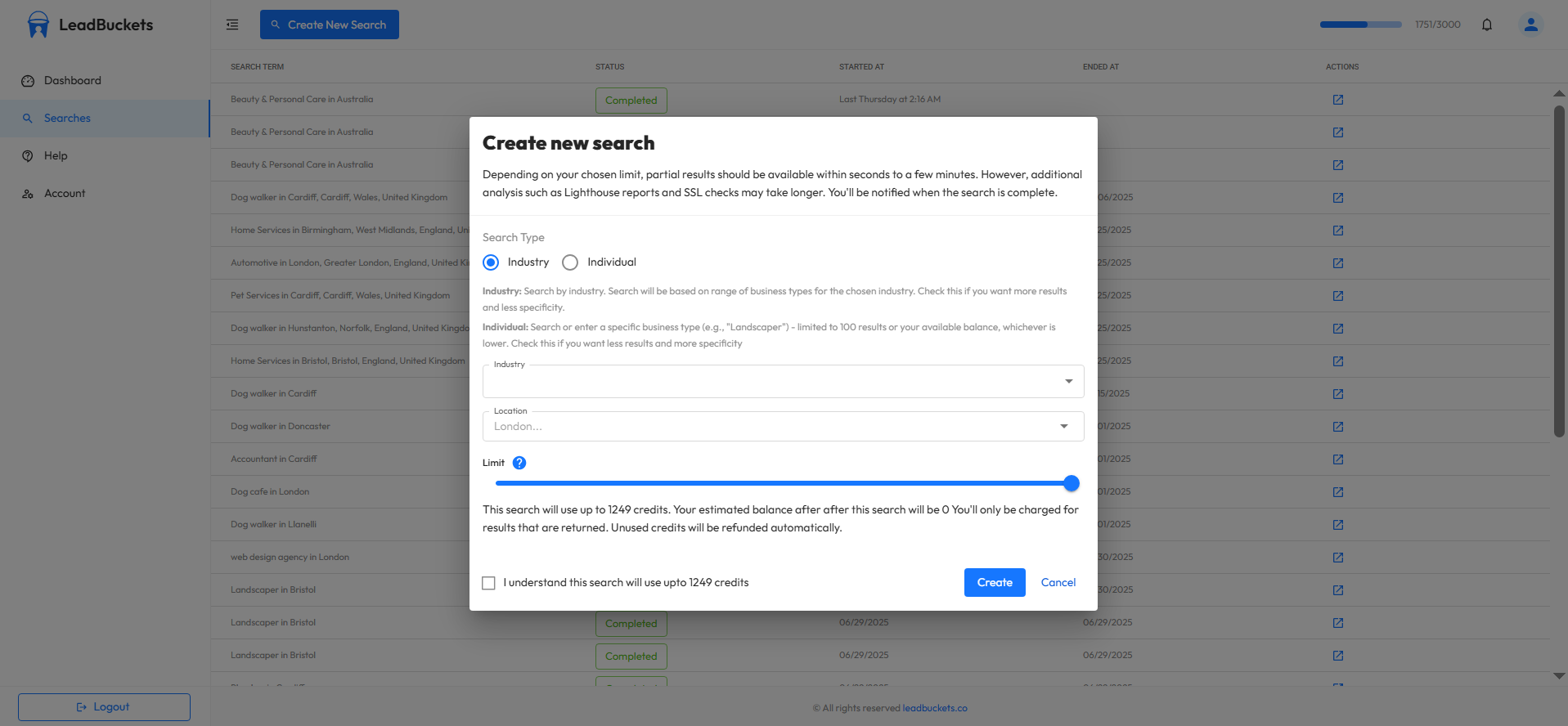
As you can see, there are several fields we need to fill out. Let's walk through each one.
Search type
There are two types of searches in our platform. These are individual, and Industry. An individual search requires you to pick a specific business type (like "roofing contractor"), while an industry search lets you simply select a whole industry. We are going to pick industry for this guide.
Industry
Since we're trying to find local SEO clients, let's pick 'Home Services' from the industry dropdown. Home services encompasses all businesses that work on the home. Think plumbers, electricians, landscapers, roofers, etc. These are ideal local SEO prospects because they generally have poor websites, yet their customers are high ticket, so they should be willing to invest in new leads.
Location
Next, we need to select a location. Let's select Leeds in the United Kingdom. Picking a location is important, especially when searching for local SEO clients. Local businesses are inundated with outreach from overseas companies. By limiting your search to businesses in your local area and positioning yourself as a local business, you will give yourself a massive advantage over your competition.
Limit
Finally, we need to choose a limit. When making an industry search, you can choose a limit up to and including your current credit balance or 3000, whichever is lower. A limit is required because we don't know ahead of time how many businesses your search will return. If fewer businesses are returned than your selected limit, then your credits will be refunded automatically.
Initial Data
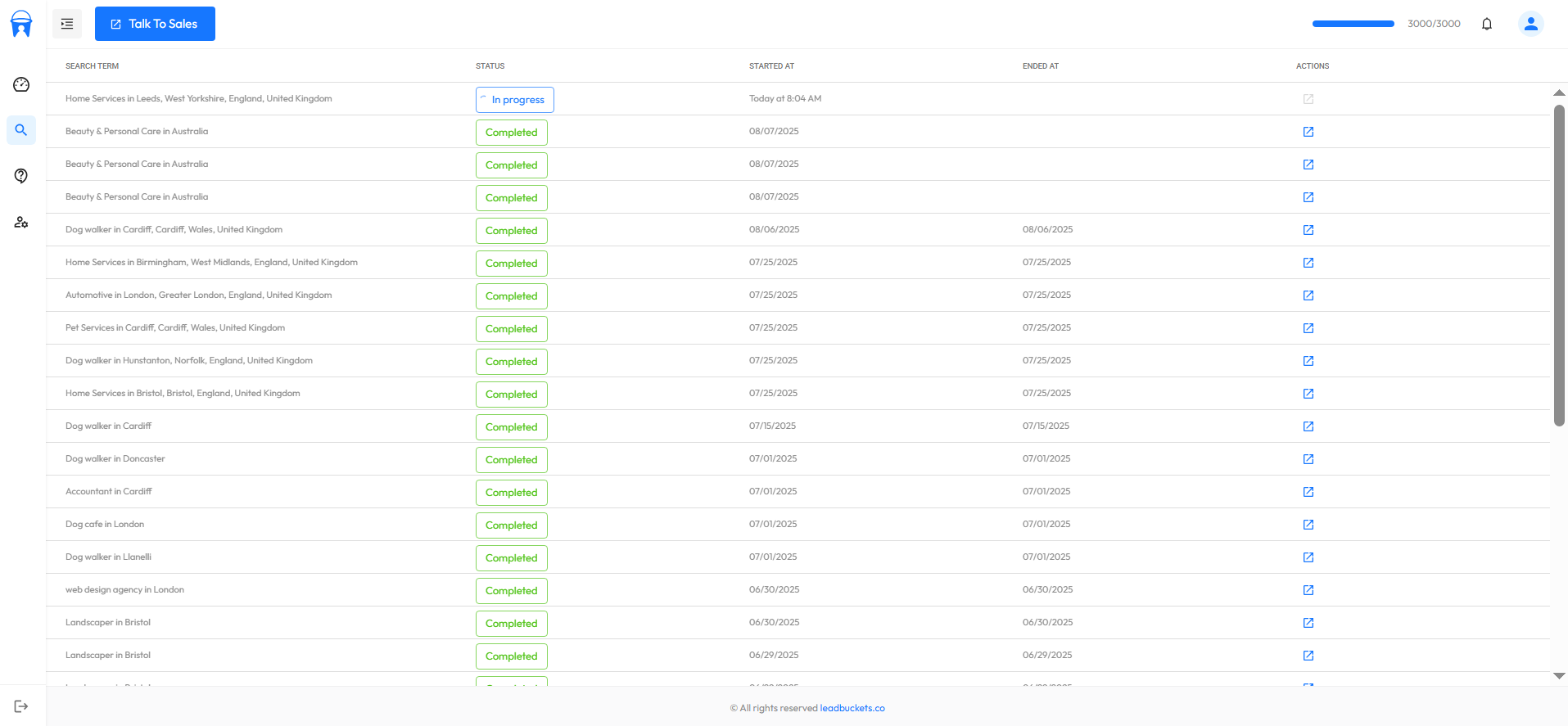
You can see from the image that the search is now in progress. Our credit balance at the time of making this search was around 1300 and we left the limit at its maximum. This means that the system will attempt to find up to 1300 results. This search will take approximately 15 minutes to complete. With that said, 'initial data' which includes basic business information like phone number will be ready within a couple of minutes. Further analysis like SEO scoring will take longer. Presuming you authorized notifications when you first logged in, you will receive a browser notification once the search has completed.
Analyzing The Results To Find Quality Local SEO Clients
Our search has completed. We are now going to filter the results to find businesses in most need of SEO services. You can see in the image that there are a number of filters that we can use to do this. In this section of the guide we are going to go through the filters that are most relevant for finding SEO clients.
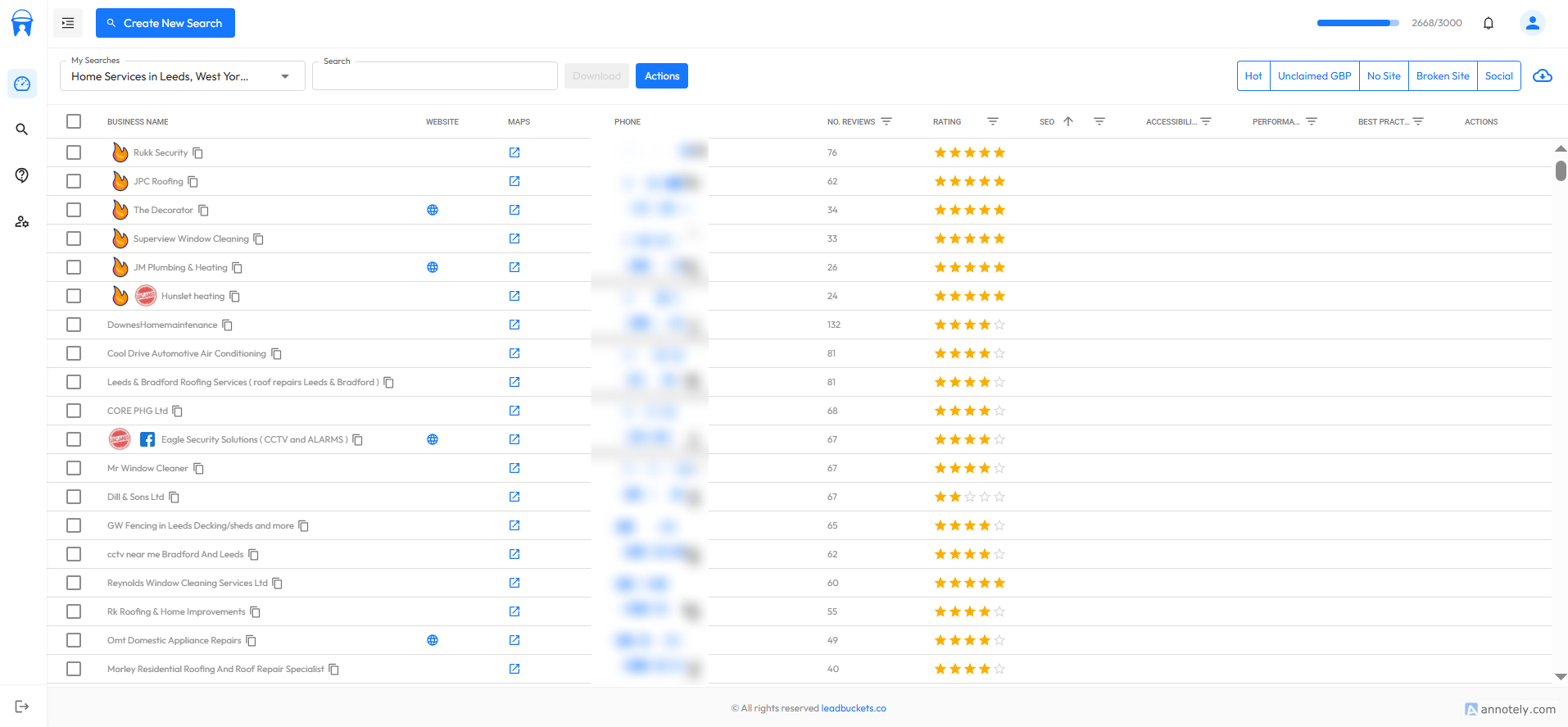
Filter By Low SEO scores
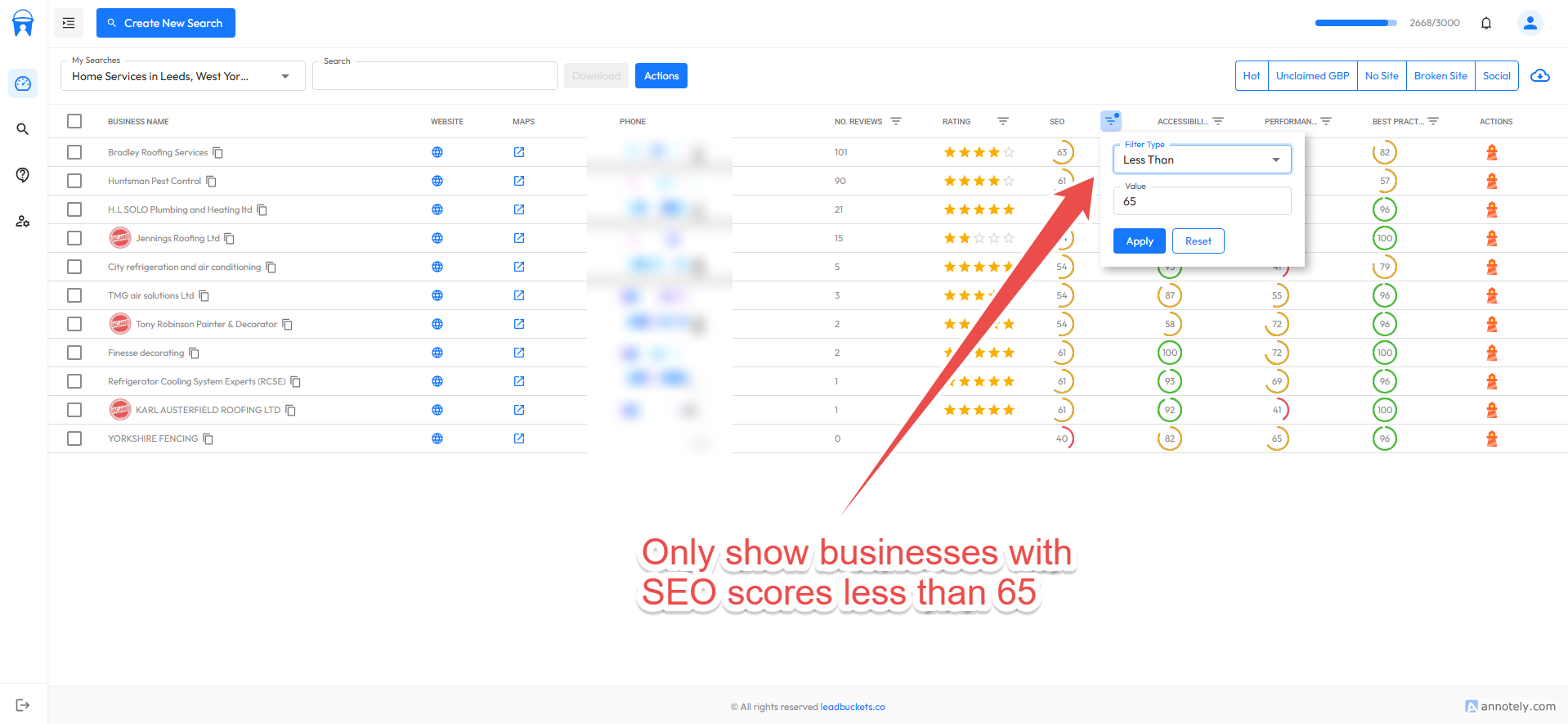
Within the table, all number fields are filterable. So let's add a filter to show businesses that have SEO scores below 65. Businesses with SEO scores below 65 will have serious technical SEO problems, and if they have scores below 60, it is very likely that they have a meta tag with nofollow or noindex in. Obviously, clients like these are gold as they will not be ranking on Google or other search engines.
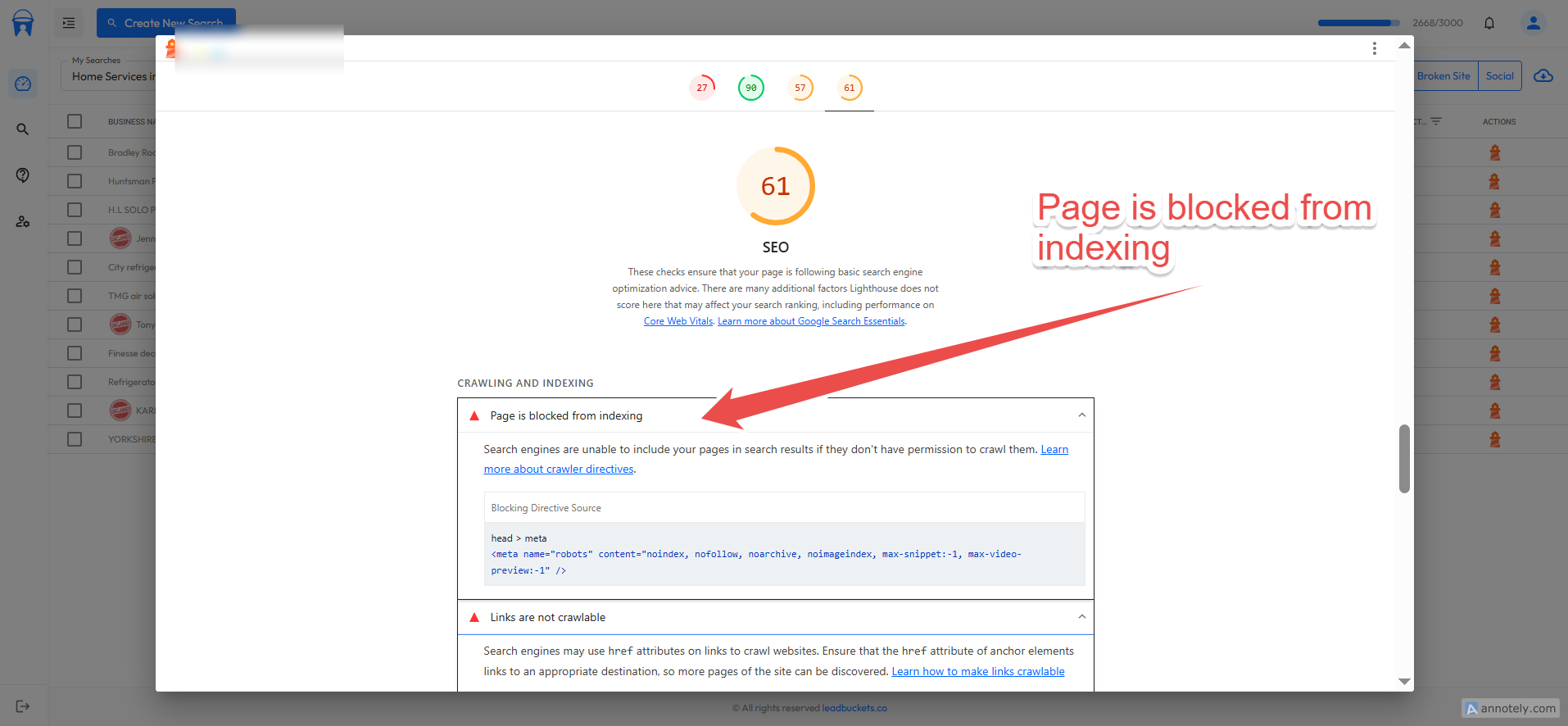
As you can see, when we click on the lighthouse icon, it will expand the report. These reports are all downloadable in HTML and JSON format. You can see that we expanded a report for a business with an SEO score of 61. It clearly shows that this business cannot rank in Google, making them a solid local SEO prospect.
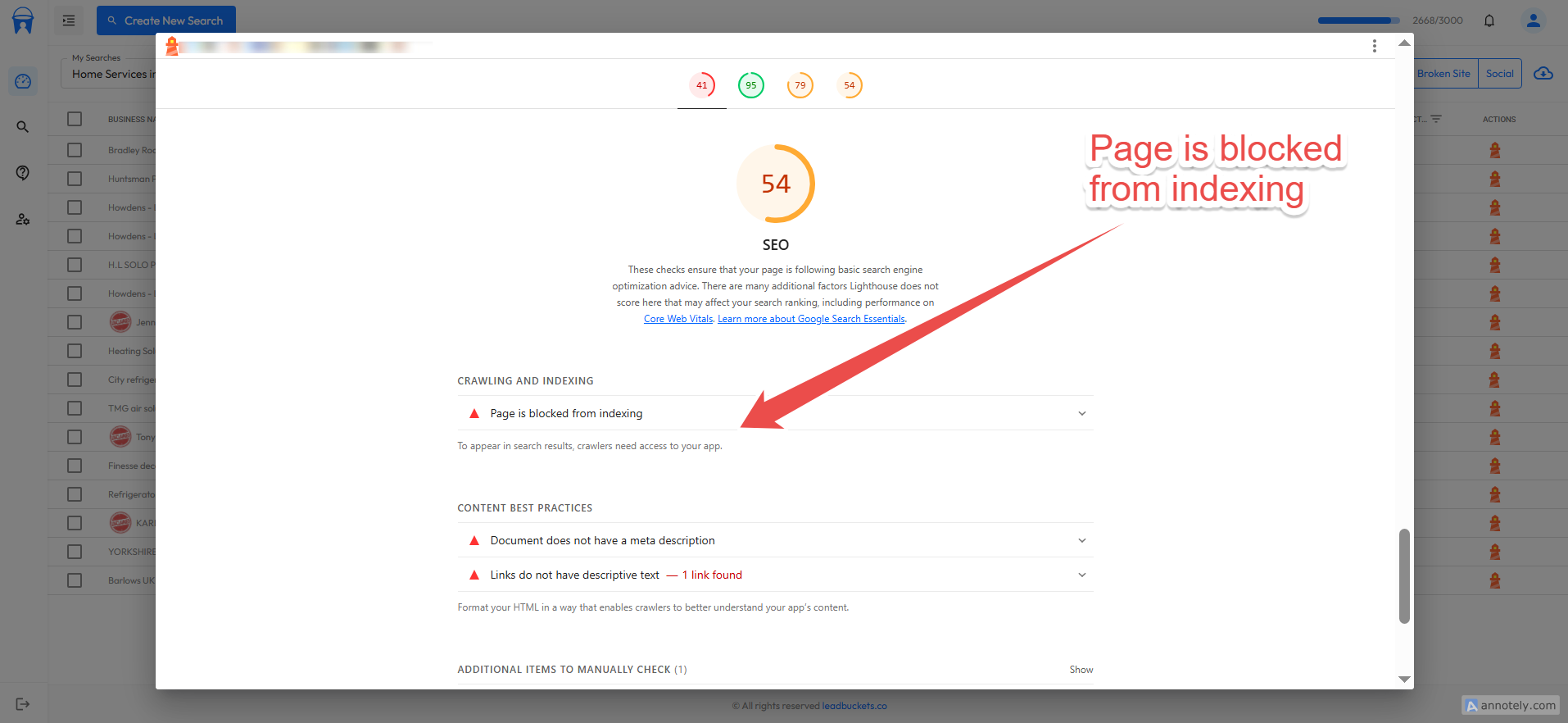
You can see in the image above that they have an even lower score and the page is also blocked from indexing. Selecting SEO scores of 65 or less gives us the most serious SEO issues that are catastrophic for local businesses. We could be less aggressive and set it to less than 75, which will pick up businesses with less serious issues like missing alt tags, invalid robots.txt, broken URLs, etc. However, for this guide we wanted to show the absolute best prospects that certainly need SEO services. Armed with this information, your outreach to these types of businesses will be so much more positive because you can show businesses their actual problems and provide potential solutions.
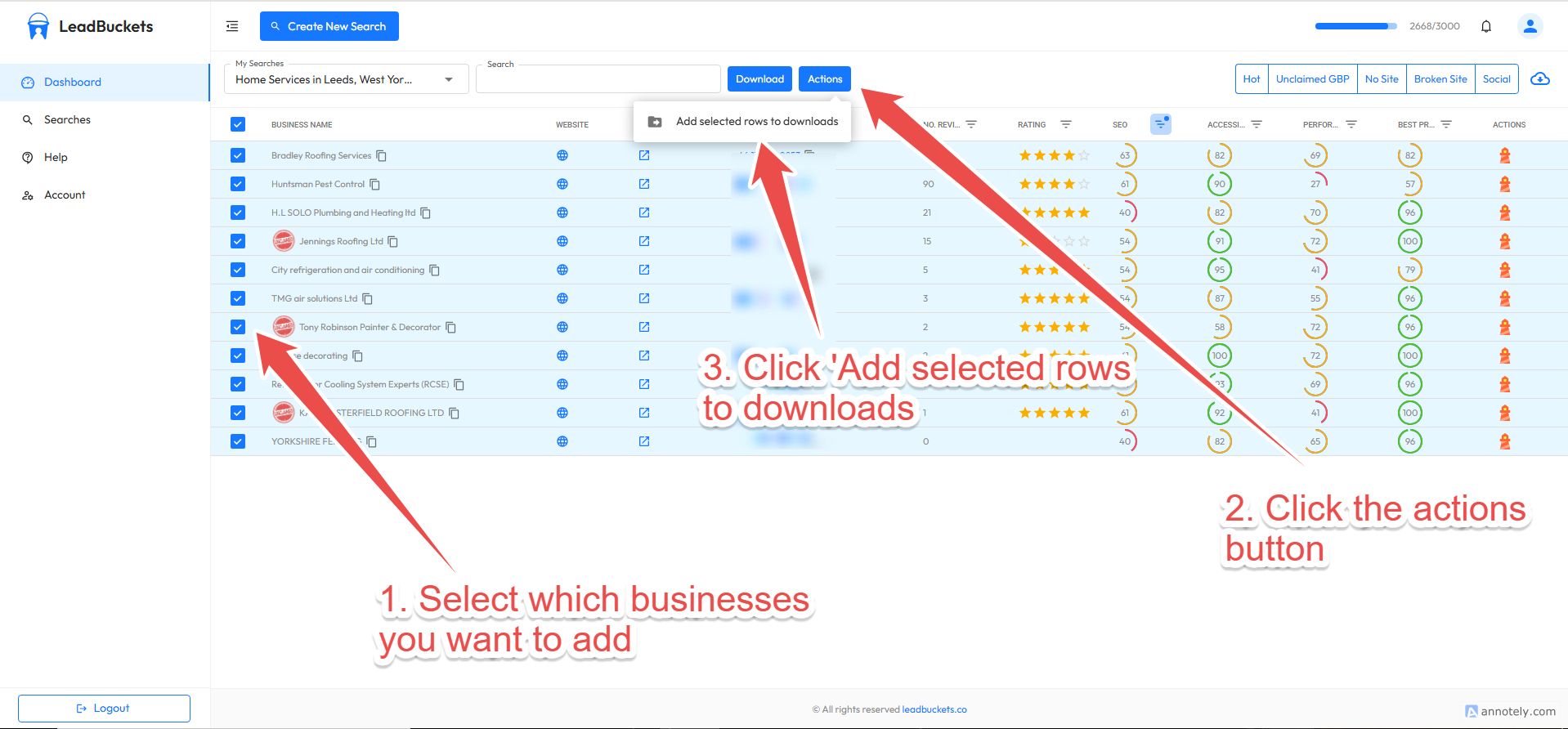
Now that we've found some good SEO clients, let's add them to our download manager. We could click the download button, but that would download all the data. Instead, we want to analyze all the results and then add the businesses we want. To do this, click on the checkboxes within the table for the ones you want to add. Then click the actions button. Then click 'Add selected to downloads'. That's it for now. We will explain how to actually export the data later in this guide.
Filter By Low Performance Scores
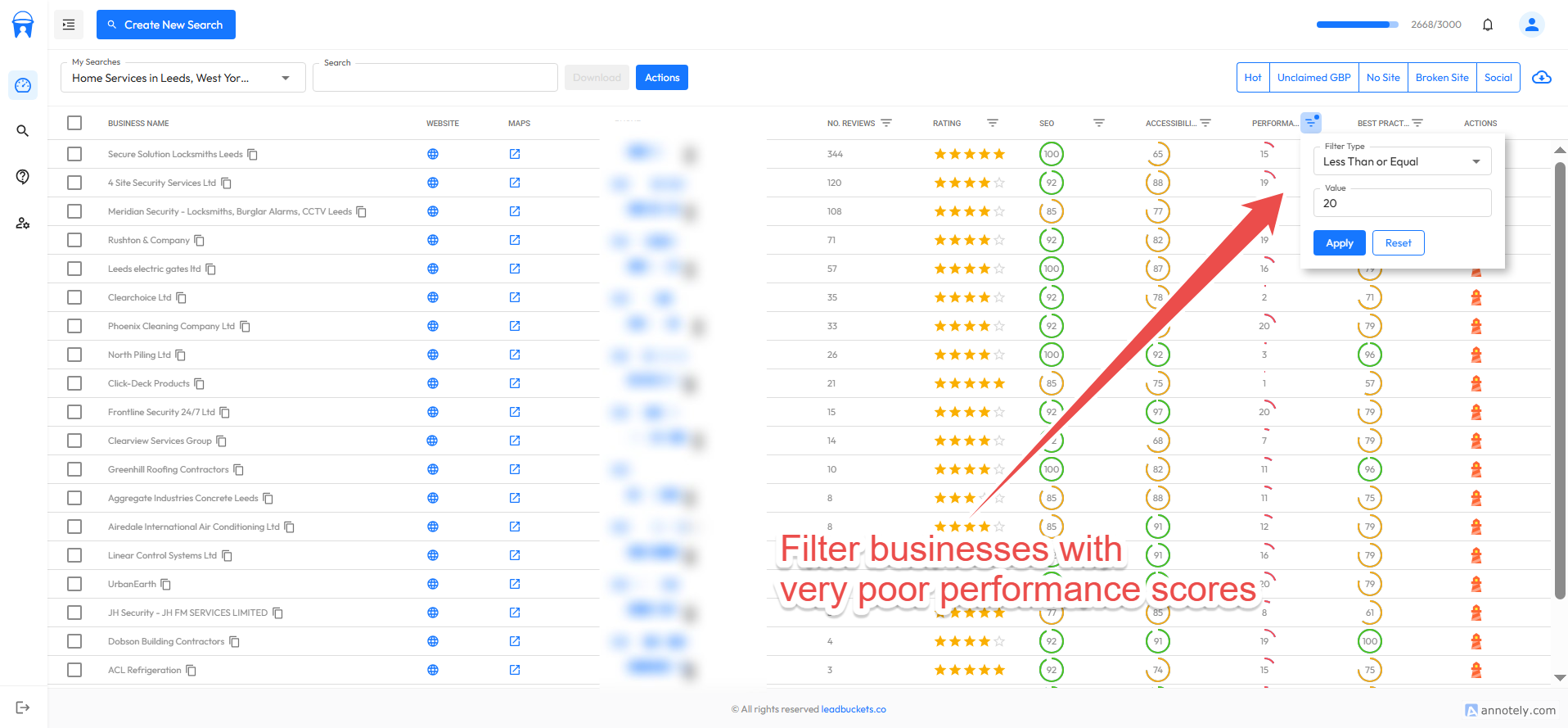
In the last section, we found some businesses that have serious SEO problems. Let's do the same but for businesses with very poor performance. Obviously, performance is a ranking factor (not the strongest), but nonetheless it is still a factor. However, there's no question that very poor performance affects businesses' conversion rates. It should be said that usually the main culprit for poor performance is too many animations and excessive JavaScript. As a result, these businesses have likely tried to create a 'good' website. It's our job to explain to them that while it might look nice, bounce rates may be high and conversions may be affected. The scores and reports available allow you to approach these businesses with real problems and provide them with real solutions. This value driven outreach is much more likely to result in a sale.
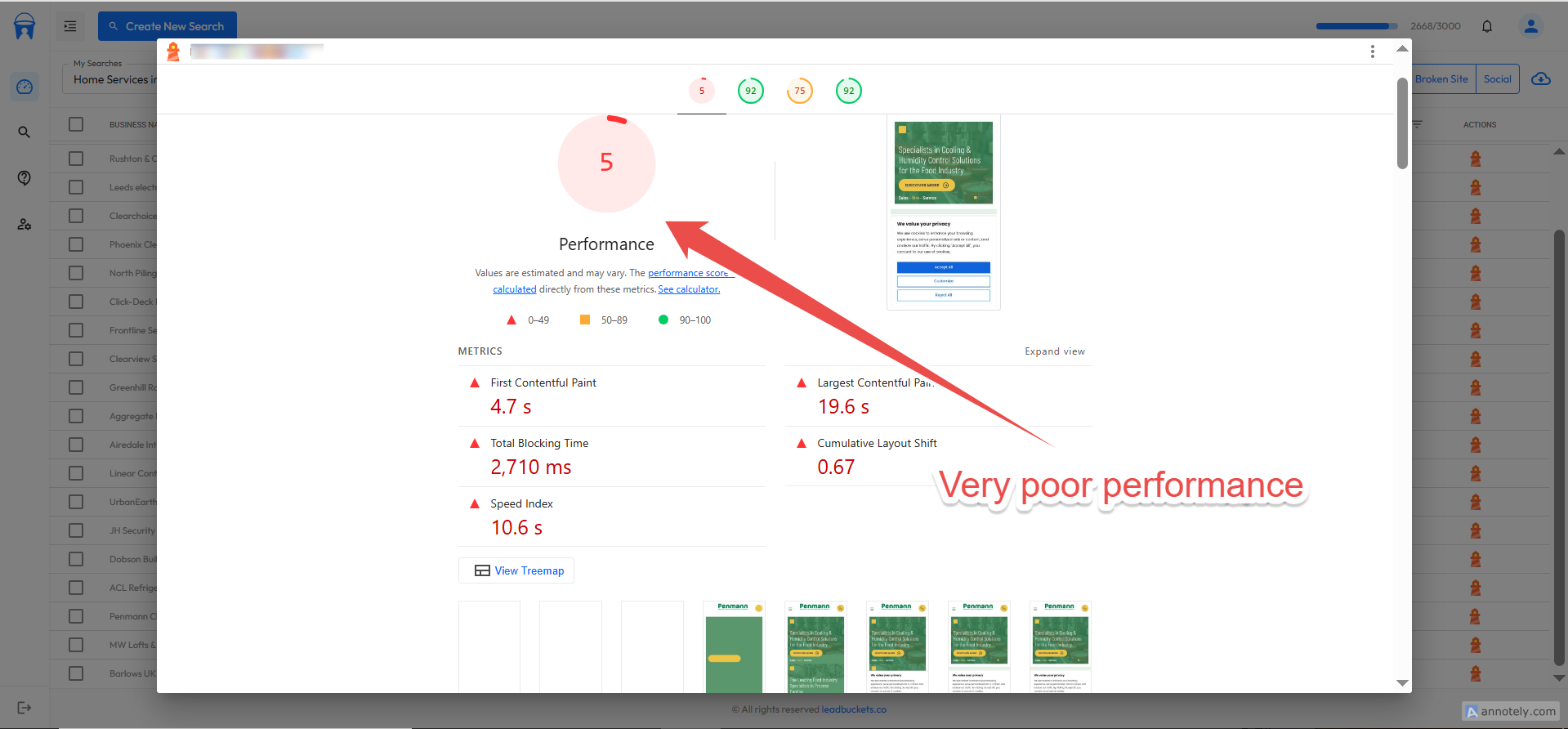
The image above shows a business with a very poor performance score. While the customer might not care about LCP, they will certainly care about their conversion rates. When reaching out to a client like this, you have a potential answer to their problem. Let's add the businesses that we want in the same way we did in the previous step.
Filter By Unclaimed Google Business Profiles
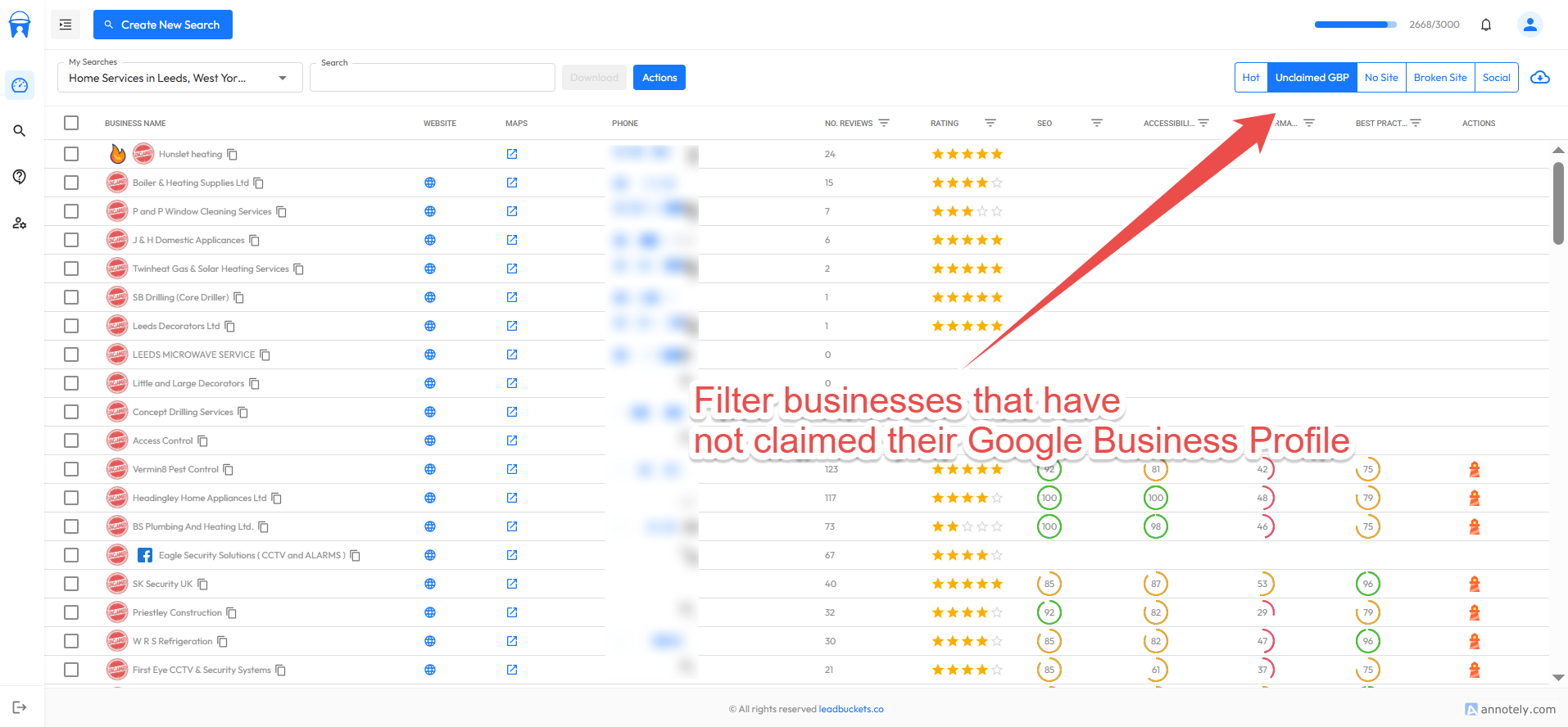
The next way in which we can find some decent prospects is to filter by businesses that have not yet claimed their Google Business profile. This is fairly self explanatory, but many small local businesses do not understand how important their Google Business Profile is for local SEO. This filter allows us to find businesses that haven't even started. These are good potential leads because taking over their Google Business profile will likely give them significantly better ranking. Let's add these businesses to our downloads in the same way that we did in previous sections.
In the next section of this guide, we will go through how to actually download our leads to a CSV file. We currently do not have a direct CRM integration, but it's something we're working on. Head to our public roadmap to let us know which CRM you'd like us to integrate with.
Exporting Data
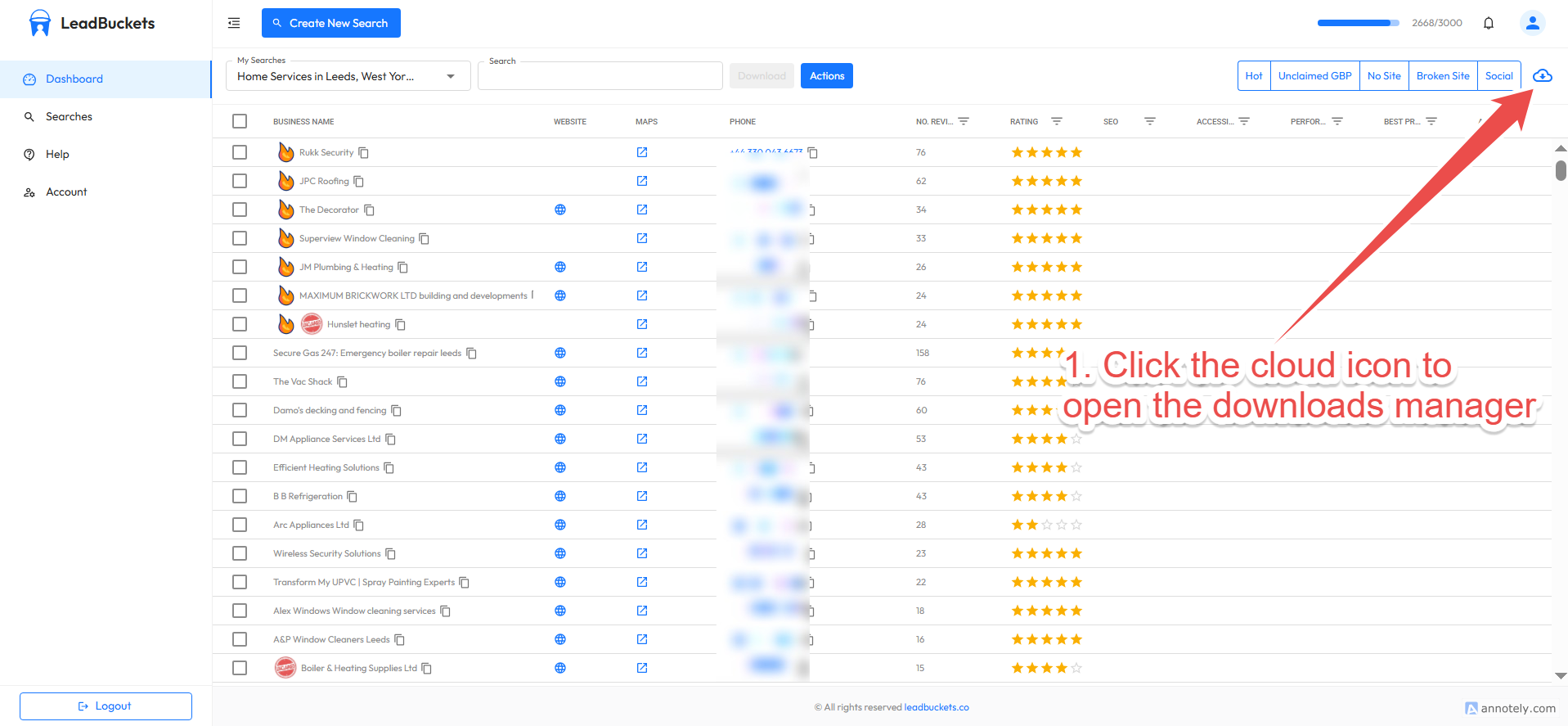
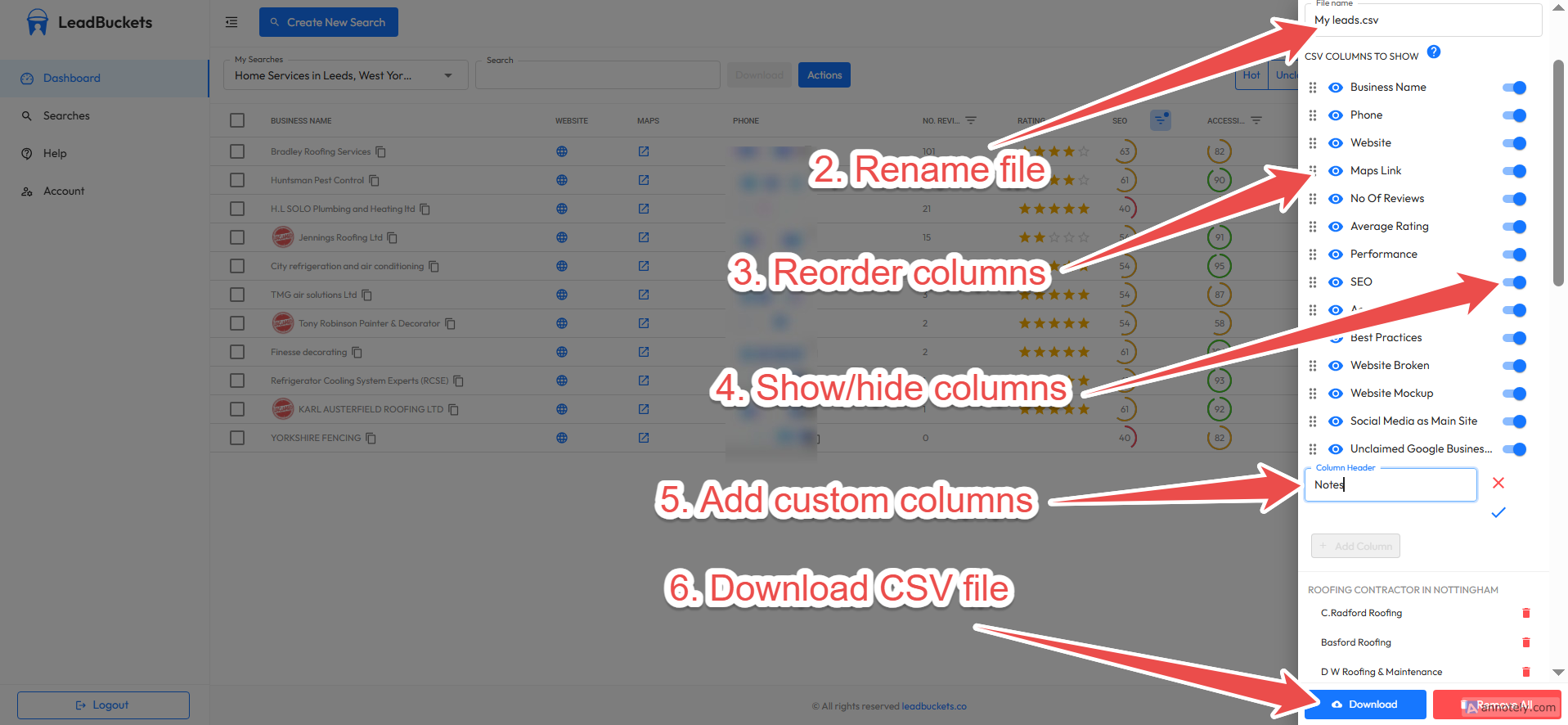
In order to download our leads we need to follow the steps below.
- 1. Click the cloud icon button to open the download manager sidebar.
- 2. If needed, you can choose the name of your CSV file. Let's call ours local_seo_leads.csv
- 3. The CSV columns are orderable. Click the drag handles to drag and drop the columns in an order that you'd like.
- 4. We can also hide columns that we are not interested in. This can help make the CSV file less cluttered.
- 5. We can add columns. There will obviously be no data, but this is helpful to make your CSV file look the same as your current system. You can add 'Notes' or 'No. calls' for example.
- 6. Finally, simply click the download button to download the CSV file to your machine.
Conclusion
In this guide we have shown you how you can find local SEO clients using our platform. We will now summarize the key points.
1. Don't be discouraged by AI and any changes to Google's search rankings. There are still opportunities to be had if you apply the correct methods.
2. Focus your efforts on local businesses in your area. Businesses are going to be far more open to doing business with you if they know you're a local business as well.
3. Find businesses with real need and reach out to them and provide value upfront. This will win every time against cold generic outreach from overseas companies.
If you have any questions or problems, please email us at hello@leadbuckets.co. You can also view our public roadmap where you can ask questions, submit bugs, or request features. This was an in depth guide on how to find web design and development clients using our platform.
Sign Up Free